


NbC: Asus Eee PC 1005HA Seashell (N270) Review
August 6, 2009 at 9:18 am
Performance
The Asus Eee PC 1005HA is powered by the common 1.6GHz N270 Atom processor, found in most of today’s netbooks. This comes with the Intel 945GSE chipset and GMA950 chip for graphics duties. The 1.60GHz Atom N270 CPU has a 533MHz front-side bus, compared to the 667MHz FSB found in the 1.66GHz N280 processor. The N270 supports Hyper-Threading Technology, allowing the operating system to run two threads on one core.
The Asus 1005HA comes with several different CPU modes to enable users to flex the speed depending on type of usage and battery conservation needed. This utility is called Super Hybrid Engine and comes with four different preset modes detailed below. Note that these modes have nothing to do with the Windows Power Saving modes which allow you to disable the monitor and HDD when not in use.
Super Performance Mode: Higher FSB of 560MHz, resulting in a maximum CPU speed of 1.68GHz.
High Performance Mode: Stock FSB of 533MHz, resulting in a maximum CPU speed of 1.60GHz.
Power Saving Mode: Lower FSB of 427MHz, resulting in a maximum CPU speed of 1.28GHz.
Performance was typical of most other N270 Atom based netbooks out there. We had no problems in light multi-tasking, browsing the web, streaming music and using Office documents. If you use the right software, there is no reason why you can’t do even heavier multi-tasking.

Video
Video performance was also no different to most other N270 netbooks. Watching YouTube videos in the browser was no problem, despite a heavy CPU load (+85 percent), although HD YouTube videos are still a no-go. Standard-definition AVI files played from the hard-drive smoothly with no frame rate drops. CPU usage was typically around the 25 percent mark when using the Videolan utility app.
Regarding 720p HD video, once again it was a mixed bag. I tried my usual assortment of HD .mov trailers played back through Vlan and performance was similar to the N270-based Samsung N120 – some worked and some didn’t. Even boosting the Super Hybrid Engine (SHE) to its highest setting made little difference. Whilst there are certain pieces of software that can improve video playback, there’s no one-size-fits-all solution. It may work for some video files and not others. If you desperately need HD video playback then its best to wait a few months for ION models to make an appearance.
Benchmarks
As usual, we ran a number of different benchmarks to see exactly how the 1005HA fares against its peers. All tests were conducted under the High Performance mode, which is the stock speed (1.6GHz) of the CPU. All benchmark tests were undertaken in battery mode.
Boot time
The Asus 1005HA had reasonably quick boot times, taking 34 seconds to reach the Start menu. Shutting down took longer at 46 seconds. Both of these were average times taken across three attempts.
GeekBench
Geekbench provides a number of different benchmarks to accurately measure processor and memory performance. The 1005HA came just above the N270-powered Samsung N120 with a score of 885.

3DMark03
Once again, performance was nearly identical to that of the Samsung N120, reaching a score of 733, compared to 734 for the N120.

3DMark06
The 3DMark06 result is one that we don’t understand. The 1005HA obliterated the field, scoring 118 3DMarks. The 1000HE was second closed at 93. Given that the 1005HA is slower than the 1000HE makes it even more difficult to explain.

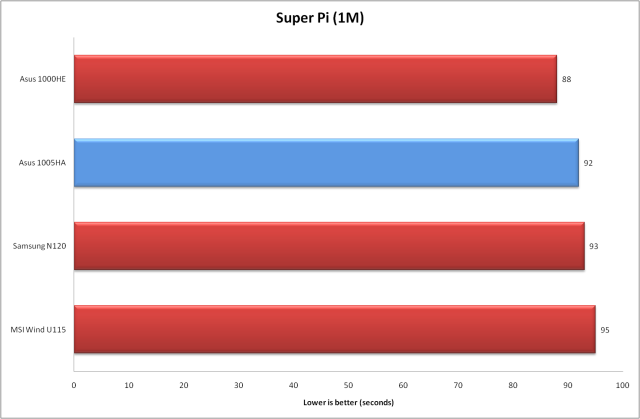
Super Pi
Using Super Pi to calculate Pi to 1 million digits took the 1005HA 92 seconds, near enough in line with the Samsung N120 (93 seconds).
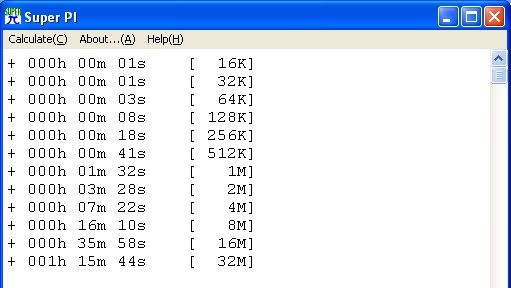
For those that may be interested, we ran Super Pi across all digits and we have included the results below.
wPrime
The top three score very similar times in this test, with the 1005HA sitting in second place just behind the MSI Wind U115. The 1005HA took 122.672 seconds to complete the 32M test.
This was also the case on the 1024M test with the 1005HA completing it in 3,942 seconds, compared to the MSI Wind U115, which was the fastest performer at 3,921 seconds.

7-Zip
7-Zip is a free compression tool and genuine alternative to WinRAR. Decompressing a large file is one of those places where a slower CPU can leave you waiting for a few seconds, so we thought it would be a fitting application to test. Using the internal benchmark this measures compression and decompression performance in MIPS and provides an average result.
It is multi-threaded so takes advantage of the latest multi-core enabled CPUs. The N270 Atom CPU supports Hyper-Threading Technology, allowing the operating system to run two threads on one core. We therefore ran the benchmark using two CPU threads. We left the benchmark to accumulate at least 10 runs using a 32MB Dictionary size in order to get a solid, average result. The 1005HA scored 1287 MIPS, marginally lower than the Samsung N120 at 1295MIPS.

Peacekeeper
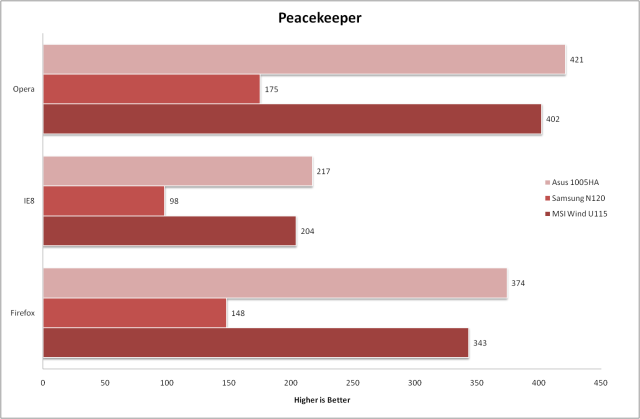
FutureMark’s Peacekeeper is a benchmark that uses JavaScript to measure browser performance during web rendering. Given that one of the main tasks on netbooks is surfing the net, we thought it we would be an apt benchmark to use. However, as you would expect, the performance can differ greatly depending on which browser is used.
For this test, we ran it across Internet Explorer 8 (8.0.6001.18702), Firefox (3.0.10) and Opera (9.64). As can be seen below, the 1005HA scored the best results we’ve seen so far.
PowerBench Powerflasher
Powerbench Powerflasher measures the performance of applications designed in Adobe Flash 10. As with the Peacekeeper benchmark, we tested it across three different browsers as stated above. This time around the performance was much closer to the other netbooks.

CrystalMark
CrystalMark is a benchmarking utility for testing your computer performance by running various benchmark tests. CrystalMark lets you test your CPU, memory, HDD and Video (GDI, Direct Draw, OpenGL). The overall score of 28,179 was lower than the Samsung N120 (28,369) and 1000HE (30,146).

CrystalDiskMark
CrystalDiskMark evaluates the performance of your hard drives based on two tests – a sequential read/write test and a random read/write test. You can select the drive to test, the number of test and the size of the data to test which can be 50MB, 100MB, 500MB and 1000MB. The results displayed below have been conducted using 5 rounds of the 100MB test. The read/write speeds for the HDD were slower than seen in the Samsung N120 and 1000HE.

HD Tune
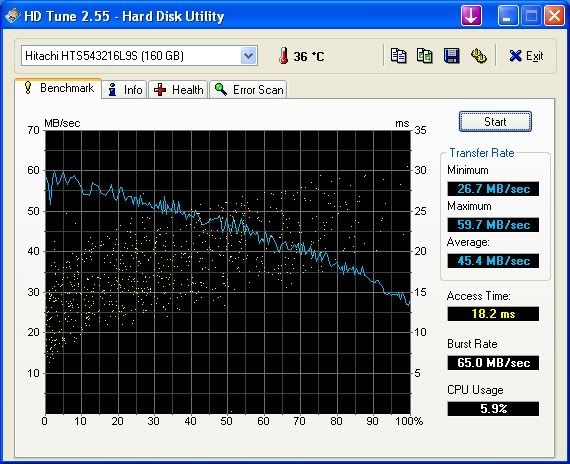
HD Tune is a hard disk utility that can measure the raw performance of your drive, including transfer rate, burst rate and access time. The average transfer rate of the HDD was 45.4MB/sec whilst the access time was 18.2ms. This was once again slower than the hard drive found in the Samsung N120.

August 12th, 2009 11:18 AM
I was told that better model doesnt maybe come sale at Finland at all. Anyway faster prosessor, bluetooth and lot better camera are big things. I dont understand why Asus had to release two models with one name and why only worse model comes for sale. I wonder if I order better model from Germany, it it possible get worse models scandinavian keyboard somewere can change it to better 1005 model. I would like 1008 and 1101 too, but 1008 you cant change battery and it doesnt have so good operating time and 1101 sounds very good, but everywere is said that its slow. Better 1005 would have been good option. Wonder if new Samsung N5xx comes sale at Finland/Scandinavia.
September 13th, 2009 1:27 AM
keep em comin Pryor, TD!!!!!!!!!!!!!!!!!!!!!!!!!!!!!!!!!!!!!!!!!!!!!!!!!!!!!!!!!
September 15th, 2009 10:40 AM
There is 1005HA-WHI012X sale now at Finland. It says N280. Does this one have bluetooth and 1.3 webcamera?
October 4th, 2009 6:45 PM
asus eee pc 1005ha is one of the best netbook in market
October 31st, 2009 10:52 PM
The power supply is very fragile…I had mine for one month and it works when it wants to. The other night the blue light on the charger would not go on. In the morning it worked…Same thing happened again tonight. Looks like I need to buy another power supply. Beware the tip is very small as well. Overall it is a good netbook. My second dislike is the left “mouse pad” click. You really need to apply about 3 times as much force as you should to get it to click. I would recommend trying it for yourself before buying. I use an external mouse because it is so hard to use. I have two laptops and do not have that problem with them. Good shopping.
October 25th, 2010 11:19 PM
Mine power supply died also. Otherwise I’m a happy user for almost a year.