


NbC: Samsung N510 Review
December 31, 2009 at 10:50 am
Display
The Samsung N510 comes with an 11.6-inch LED backlit display with a high resolution of 1366 x 768 pixels. Despite the trend towards glossy displays, it is great to see the N510 sporting a matte (non-glare) display.
Whilst it may not offer the vibrant colours of a glossy display (indoors), matte displays are much more practical for day-to-day use. For a device that may be used on the road, a matte display means you do not have to contort yourself and your netbook into funny shapes just to read what’s on the screen.

The display is easy enough to read even under strong lights. However, I often found that brightness levels needed to be at least 75 percent to be legible. Above this level there were no problems, however below this level the display was too dim to read properly. You would only probably go below if sitting in a low-light environment such as a plane.

Under strong light the display is barely readable although we’d still prefer to have this netbook out on the road with us compared to one with glossy display.

Matte displays don’t give you the colour saturation found on glossy displays, despite this the contrast and detail was good. The screen is viewable under most lighting conditions with reasonable viewing angles. Text was rendered crisp and sharp.

We found the high resolution (1366 x 768) display a joy to use. Yes text is sharper and smaller than we’re used to seeing on a 10-inch netbook, but this HD resolution combined with a larger 11.6” display worked well. We think this is a sweet-spot for netbooks and believe that a 10-inch netbook with HD display would be uncomfortable over long periods.

Speakers
The Samsung N510 comes with two 1.5 watt speakers located on the underside of the chassis. The sound quality is nearly as good as that found on the Samsung N120, although the missing subwoofer does make a difference in terms of the mid-range. The Samsung N120 also had front mounted speakers that gave better audio imaging, something that’s difficult with bottom mounted speakers.
The N510 doesn’t deliver the loudest volume but it maintains composure even at its highest levels. Sound was crisp and combined with SRS is some of the best you’ll hear on a netbook.

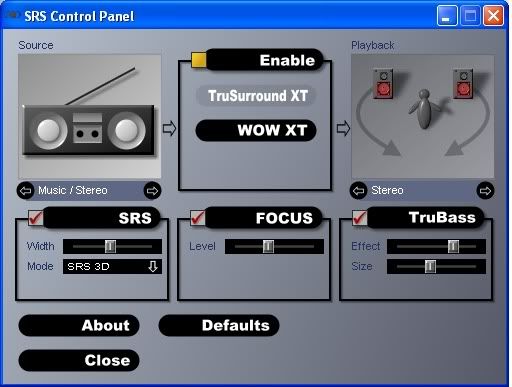
The Samsung N510 comes with SRS software that really makes a difference depending on the audio source. Different settings can be used for music or movies. The difference between SRS being on and off is quite stark. Turning SRS off leaves music sounding very flat.
We only wish it was better located, SRS can be found in the Control Panel, however a useful tool like this should be either on the Desktop or Program shortcut. I wonder how many people will even know it exists.
Heat & Noise
We found the Samsung N510 to be reasonably cool, even during extended use. The palm rest never gets uncomfortably hot and the vent only emits warm air at worst.
Noise levels were also quiet at anything but high loads. The N510 is not silent under normal use, however the slight whirr is not disturbing. Under high CPU usage you can hear the fan, but it didn’t distract me.


December 31st, 2009 11:06 PM
you should try to make your review a little more thorough- lol jk
January 5th, 2010 1:31 PM
Very nice review Tej! It certainly seems like a winner, until a newer one comes out…
One question though: For you XP is a negative while I would think it is more of a positive at is keeps cost down, less likelyhood for ‘errors’ (craches), longer batery life and the ability to run all necessary programs at the same time.
The latter referring to Windows7 starter of course.
Keep up the good work lads!
Igor
January 5th, 2010 1:50 PM
Fair points Igor. I suppose compared against the Asus Eee PC 1201N, which will come with Windows 7 Home Premium, I just felt that the N510 should be priced more keenly. Especially as both have the same recommended price, but the 1201N is also equipped with a dual-core Atom.
Personally, I have no isses with Windows XP, but when it comes to DXVA compatibility (bult-in WMP12) and likely better future driver support (just look at the situation with GMA500 drivers), Windows 7 has the edge if you’re keen on playing HD video content.
However, saying that, I had no problems in getting HD video to work in XP, you just have to know the right programs to use (a lot of people don’t!) I’m also not sure whether I’d want to suffer the battery downgrade that W7 would also bring…
January 6th, 2010 7:47 PM
Hi,
You know if the motherboard has eSata capabilities ?
I see your modd on the asus and i would like to know if it’s possible with the N510 🙂
Thanks,
January 7th, 2010 6:22 PM
XP works well. Hopefully we still get to see XP in newer netbooks to dish out HD content flawlessly, save battery life and ofcourse cost even if MS is gunning for Win7 sales. I use XP & its doing its job well & so I intend to keep it running for a long time.
Couldn’t have asked for better reviews … this is best !! We await newer model reviews from Tej. Any from CES ?
March 15th, 2011 12:32 PM
The NVIDIA chip on this is not compatible with Philips HD tvs. So if you connect it via HDMI you get video but audio stays on the N510.
Not an issue for most, but it is for me, as I bought it specifically to connect to a Philips.
March 28th, 2011 11:26 AM
The Samsung N510’s battery (Samsung aa-pb0uc3b).